
Walter Apps: Build Your Own Logistics Tools, No Coding Required

Your TMS already gives you route optimization, automatic dispatch, invoicing, real-time tracking… But there’s always that one thing missing. The dashboard you’ve been picturing for months. The form you’re still cobbling together in Excel. The view that only you know exactly what it should look like. That’s precisely what Walter Apps are for.
A TMS is powerful. But no software can anticipate everything.
The transport and logistics sector is one of the most diverse industries out there. An express courier running point-to-point deliveries doesn’t have the same needs as a retail distributor managing ship-from-store, nor as a cargo bike company trying to showcase its carbon impact to clients. Off-the-shelf tools cover 80% of the need. The remaining 20%? It usually ends up on an Excel sheet, a makeshift Notion table, or stuck in a dispatcher’s head. WApps — short for Walter Apps — are Everest’s answer to that problem. Built directly into your TMS, they let you create fully custom applications: piloting dashboards, custom forms, reporting tools, business connectors… without writing a single line of code.
What you can build with a WApp
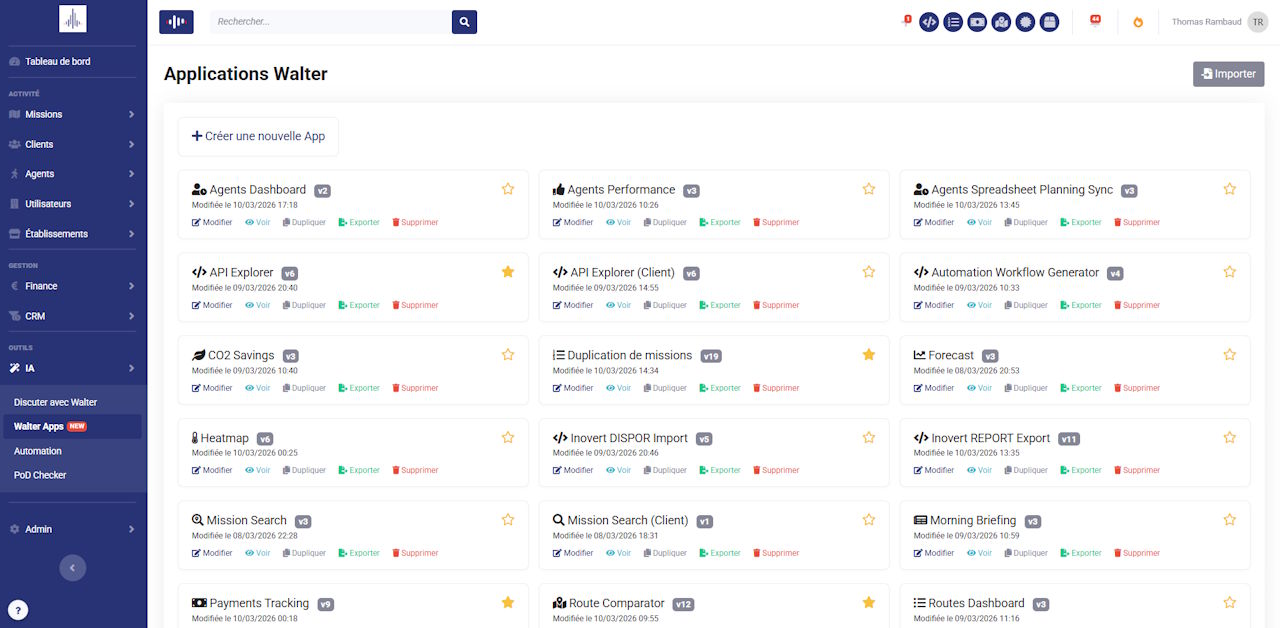
The best way to understand what WApps do is to see what our clients have already built:
- An SLA compliance radar that analyses week by week the gap between promised and actual delivery times, by service and by client
- An agents dashboard showing each driver’s activity in real time — assigned missions, current statuses
- An automated Morning Briefing summarising every morning’s missions, alerts and watch points
- A custom order form embeddable directly on a website, automatically creating the mission in Everest upon submission
- A payment tracker cross-referenced with mission status to anticipate follow-ups
- A delivery heatmap showing geographic concentration over a given period
- A route comparator to validate gains before rolling out a new delivery organisation
And that’s just a sample. We currently have around thirty templates available in the gallery — and the list keeps growing.
How it works in practice
You describe it, Walter builds it
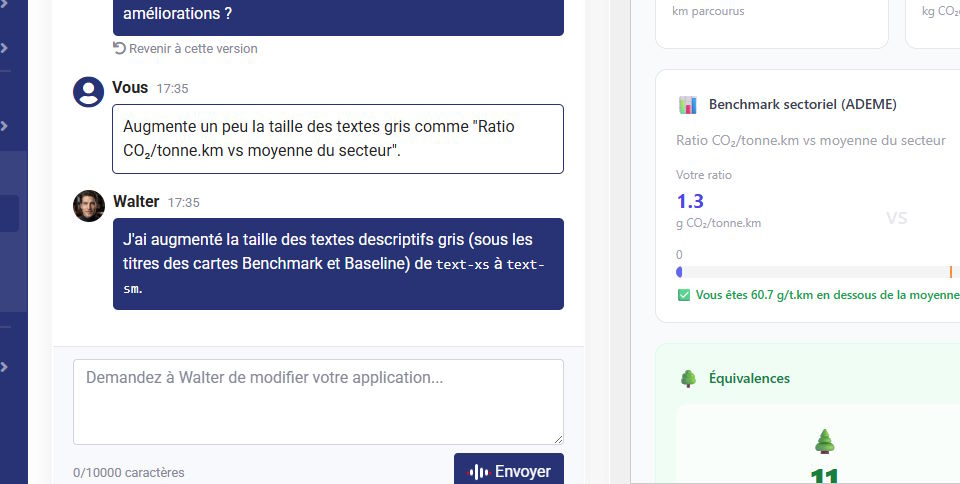
From the AI > Walter Apps menu in your Everest account, you can access your app gallery or create a new one. When you click “+ Create a new App”, you open a two-column interface: on the left, a conversation with Walter, Everest’s AI agent — on the right, a live preview of what it’s building. You simply describe what you want, in plain language, the way you’d explain it to a colleague. Walter rephrases what it understood, confirms the features it’ll implement, and generates the app within seconds. The preview appears immediately on the right. No forms to fill in. No technical setup. Just a description.
The art of briefing your WApp well
The quality of the app depends directly on the quality of your description. Here’s how to get the best result from the start: Describe the goal, not the technique. Start with why you’re building this tool. “I want to be able to compare my agents’ performance over the last 30 days” is a better starting point than “I want a bar chart”. List the data you need. What information should appear? Missions? Specific agents? A date range? Particular statuses? The more precise you are about the content, the more relevant the app will be. Describe the expected interactions. Should the tool be filterable? Should clicking a row open the mission detail? Are there actions to perform (create, edit, send)? Specify the usage context. Is this an internal tool for you and your team? For your clients? For embedding on your website? This shapes the design and access permissions.
Example of a good brief: “I want a tracker for outstanding payments. I need: client name, mission reference, amount, due date, and a visual indicator based on how overdue it is (green/orange/red). I should be able to filter by client. It’s for my accounting team, so a clean light theme.”
Refining and adjusting: it’s a conversation
Once the preview is generated, if something doesn’t work for you — just say so. Walter adjusts in real time. “Make the text in the table larger.” “Add a CSV export button.” “Change the header colour to match our brand.” “Add a filter by establishment.” Each message triggers a new cycle: update → live preview. You iterate until you have exactly what you need. It’s as simple as sending a message to a colleague.
Once your app is ready: three ways to deploy it
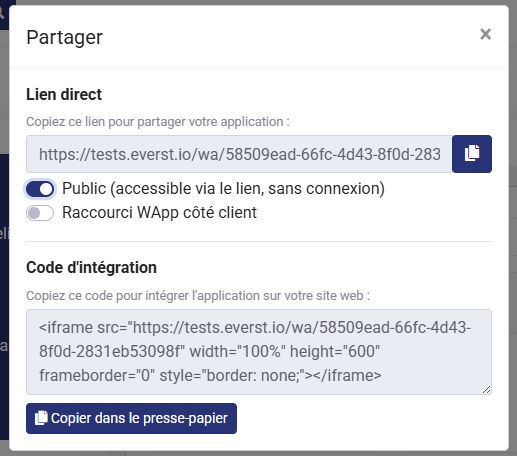
This is where WApps show their full potential. Inside Everest, accessible to you and your team from the gallery. You can even pin your favourite WApps to the navigation bar for one-click access. Via a public link, no login required. Perfect for sharing a report with a client, sending a form to a partner, or giving access to a specific tool without creating an account on your platform. Embedded in your website, using a simple integration code (iframe). Two lines to paste into your CMS, and your WApp is live directly on your site, in your brand’s colours.
Advanced capabilities: for those who want to go further
WApps aren’t limited to data visualisation. They can also interact with your technical environment:
- Third-party API connections: your WApp can pull data from other tools — ERP, CRM, BI platforms, e-commerce systems…
- FTP exports: some business workflows require structured exports to remote servers. That’s doable.
- Creating missions and triggering actions: your WApp doesn’t just read data — it can create it too. An order intake form that directly generates the mission in Everest, for example.
All of this, still by describing what you want to Walter. It knows the Everest API and knows which call to make for each action.
Why this is a genuine shift
Until now, customising a TMS meant waiting for a product update, paying for bespoke development, or juggling between tools that didn’t talk to each other. With WApps, the time between an idea and a working tool is measured in minutes. You don’t need to know how to code. You don’t need to wait. You describe what you need, refine it, and deploy it. That’s what our clients have been doing since they got access — and honestly, it’s hard to go back once you’ve started. Walter Apps are available now in your Everest account, if you have the “Walter” option. Head to the AI > Walter Apps section, try an existing template, or dive into creating your first app. And if you’d like help designing a tool tailored to your operation, our team is happy to talk.